devise认证登录
作者:gcbeen
日期:2014年03月05日
devise认证登录
ruby 1.9.3 rails 3.2.16 devise 3.2.2
1.install devise
gem 'devise'

# terminal
bundle
rails g devise:install
rails g devise user
rake db:migrate
2.配置devise
# config/routes.rb
# 配置controller 由命令rails g devise user生成
devise_for :users
root to: "home#index"
3.devise认证
# app/controller/application_controller.rb

before_filter :authenticate_user!
4.设置user model
  # Include default devise modules. Others available are:
  # :confirmable, :lockable, :timeoutable and :omniauthable
  devise :database_authenticatable, :registerable,
         :recoverable, :rememberable, :trackable, :validatable,
         :confirmable, :lockable

  # Setup accessible (or protected) attributes for your model
  attr_accessible :email, :password, :password_confirmation, :remember_me
5.发送相关邮件信息
# config/environments/development.rb
# 配置邮件发送的主机地址
config.action_mailer.default_url_options = { host: 'youhost.com' }

# config/initializers/devise.rb
# 设置发送地址
config.mailer_sender = 'your_email@126.com'
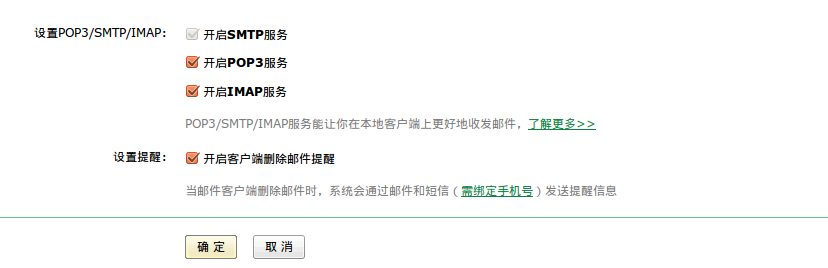
6.设置邮箱信息
7.设置rails发件信息
config.action_mailer.delivery_method = :smtp
config.action_mailer.perform_deliveries = true
config.action_mailer.smtp_settings = {
  :address => "smtp.126.com",
  :port => 25,
  :domain => '126.com',
  :authentication => 'plain',
  #:enable_starttls_auto => true,
  :user_name => "your_email@126.com", #你的邮箱
  :password => "your_password" #你的密码
}
8.修改相应的view文件
devise
  |_confirmations
  |   |_new.html.erb 注册页面
  |
  |_mailer
  |   |_confirmation_instructions.html.erb  确认激活邮件模板
  |   |_reset_password_instructions.html.erb  忘了密码重置密码邮件模板
  |   |_unlock_instructions.html.erb 解锁邮件模板
  |
  |_passwords
  |   |_edit.html.erb 忘了密码重置密码页面
  |   |_new.html.erb 忘了密码发送邮件页面
  |
  |_registrations
  |   |_edit.html.erb 信息修改页面
  |   |_new.html.erb 注册页面
  |
  |_sessions
  |   |_new.html.erb 登录页面
  |
  |_shared
  |   |_ _links.erb 共享链接
  |_unlocks
      |_new.html.erb 解锁邮件发送页面
- 两个方法
user_signed_in?
current_user
blog comments powered by Disqus